Most database problems get blamed on queries, schemas, or infrastructure, and rarely on SQL Server ODBC drivers. Fair enough, those components often break. But in many cases, the real culprit is the connection layer itself. Poor drivers can lead to security gaps, performance hits, cloud connection struggles, Unicode issues, or incompatibility across platforms and modern SQL Server versions.
That’s why choosing the right SQL Server ODBC connector is critical for reliable connectivity in modern environments. This guide evaluates leading commercial and widely used ODBC drivers using practical technical and operational criteria, so you can confidently choose the right one for your environment.
Summary
- Reduce risk from unstable or incompatible connectivity layers.
- Avoid costly deployment and integration failures.
- Choose drivers that support long-term system stability.
- Prevent performance issues that disrupt operations.
- Select a solution that scales with your infrastructure.

Why trust the showcased ODBC driver reviews
These evaluations reflect how ODBC drivers perform under real-world complexity. We tested them across:
- Authentication models (such as SQL authentication, Windows authentication, and, where supported, Microsoft Entra ID).
- Multiple SQL Server versions (from older on-prem to Azure SQL).
- Diverse client platforms (like Windows, macOS, and Linux).
This ensured that both installation friction and runtime behavior were thoroughly tested, not just listed features. Moreover, all findings were produced through independent testing and were not influenced by vendor sponsorship or paid placements.
Evaluation methodology
| Evaluation area | What was tested | Why it matters |
|---|---|---|
| Installation & connectivity | DSN and DSN-less ODBC to SQL Server connections across typical environments | Reveals real setup friction and compatibility issues |
| Platform coverage | On-prem SQL Server, Azure SQL, managed endpoints | Ensures drivers work across deployment models |
| Authentication support | SQL auth, Windows auth, Microsoft Entra ID, where available | Confirms compatibility with modern security standards |
| Operational stability | Long-running sessions, connection resilience, and Unicode handling | Identifies reliability under production workloads |
| Environment dependencies | Driver managers, OS behavior (macOS/Linux) | Surfaces platform-specific limitations |
| Documentation & support | Clarity, troubleshooting depth, and release transparency | Indicates vendor maturity and maintainability |
This is not a vendor-paid ranking. The objective is simple: make your next ODBC connection to SQL Server predictable, stable, and production-ready.
List of the best ODBC drivers for SQL Server
TL;DR: We evaluated widely used SQL Server ODBC drivers currently deployed in production environments. Devart’s ODBC Driver for SQL Server stands out for cross-platform deployments and controlled network environments, while Microsoft’s driver remains the go-to for Windows-heavy environments. The following list breaks down each driver’s strengths and limitations so you can choose the best fit for your needs.
1. Devart ODBC Driver for SQL Server

Best for: Cross-platform deployments and controlled network environments.
Rating: 4.6/5 on G2
Devart’s ODBC driver for SQL Server is designed for high-performance, Unicode-capable connectivity from desktop, server, and cloud applications. It targets ODBC-compliant tools used in analytics, BI, and ETL workloads and supports direct connectivity that reduces reliance on external client libraries.
Operationally, the driver is well-suited to scenarios that require more than basic SQL Server ODBC connectivity, particularly restricted or segmented networks. It supports secure transport options such as SSL as well as tunneling methods (SSH/HTTPS) that can be useful when database endpoints are not directly accessible from client environments.
The driver also supports common SQL Server authentication methods and is designed for stable performance under production workloads. However, compatibility with newer SQL Server releases depends on the driver version in use, so teams should verify support for their specific deployment.
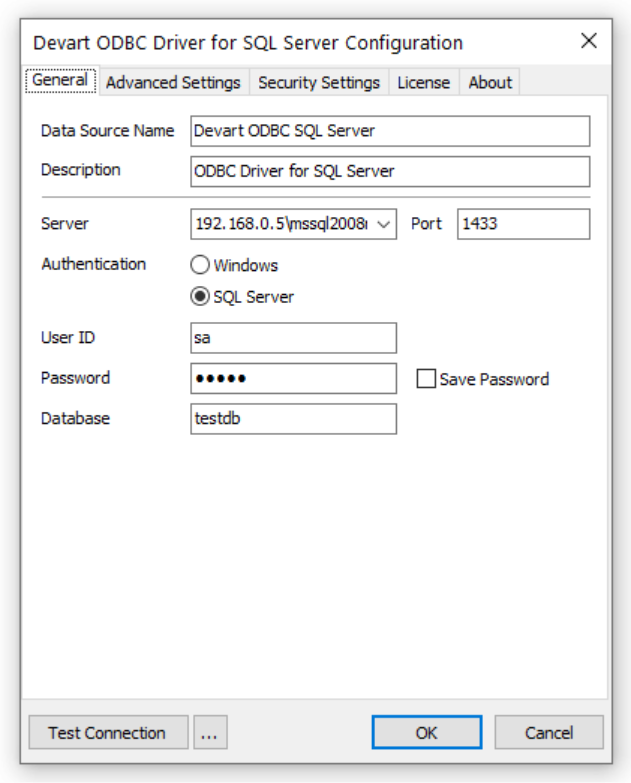
For detailed connection instructions, refer to the official documentation.
Overview table
| Details | |
|---|---|
| Company | Devart |
| Platform | • Windows, macOS, Linux, Apple Silicon |
| Features | • Full ODBC compliance • Advanced SQL Server ODBC connection parameters • Encryption and network controls • SSH/HTTPS tunneling |
| Pros | • Cross-platform support • Deep configurability • Works in restricted network environments |
| Cons | • Paid licensing for production use • Setup may require configuration familiarity |
| Price | • Desktop: €179 • Universal Bundle: €499 • Server Standard: €999 |
Editor’s insight
During evaluation, this ODBC driver for SQL Server proved most compelling in scenarios involving non-standard network conditions and heterogeneous environments. In particular, its tunneling and connection-level configuration options make it practical for teams working behind firewalls, across VPNs, or within segmented infrastructure.
However, it’s less likely to appeal to teams seeking minimal setup or simplified configuration layers. The driver is best suited to environments where control, compatibility, and deployment flexibility matter more than quick installation.
User reviews
The catalog of ODBCs is incredible, as it allows connection with all types of database files, as well as with databases in general. I use it in my day-to-day, especially for Business Intelligence projects, such as reports in Power BI. It is super easy to integrate and install in any infrastructure. The support is splendid. — G2 reviewer
2. Microsoft ODBC Driver for SQL Server

Best for: Native SQL Server environments and Microsoft-centric infrastructures
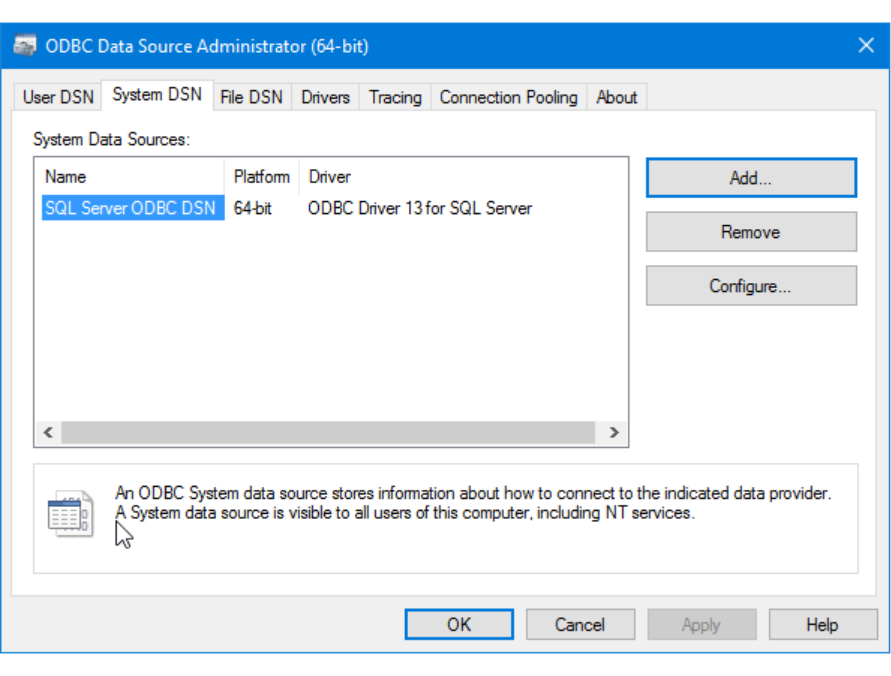
Microsoft’s SQL Server ODBC driver is the reference implementation for ODBC connectivity to SQL Server. It is widely adopted because it is free, maintained by Microsoft, and released in parallel with SQL Server and Azure SQL updates. In 2026, the commonly deployed version is ODBC Driver 18 (18.6.1.1 GA, released December 17, 2025), while version 17 remains in use for legacy compatibility.
The driver supports a broad range of SQL Server versions, modern authentication methods, and encrypted connections, and is designed for stable performance in production environments. It integrates directly with SQL Server security features such as Always Encrypted and natively supports Microsoft Entra ID authentication for cloud deployments.
Overview table
| Category | Details |
|---|---|
| Company | Microsoft |
| Platform | • Windows • Linux • macOS |
| Features | • Native SQL Server protocol support • Always Encrypted compatibility • Entra ID authentication • Side-by-side driver version installs |
| Pros | • Free and officially supported • Tight integration with SQL Server security • Strong compatibility across Microsoft ecosystems |
| Cons | • More complex setup on macOS/Linux • Some environments require version pinning |
| Price | • Free |
Editor’s insight
If your infrastructure is built primarily around Microsoft technologies, this driver is usually the most predictable choice. Because it’s developed alongside SQL Server itself, compatibility with new database features tends to arrive quickly, and security capabilities like Entra ID or Always Encrypted are implemented natively. It also supports recent SQL Server enhancements, including features introduced for Azure SQL environments and specialized data types such as vector data types used in advanced analytics and AI workloads.
Where teams sometimes run into friction is outside Windows environments. On Linux or macOS, configuration can take longer due to driver managers, authentication setup, or Kerberos requirements. In those cases, the driver is still capable, but it rewards teams comfortable with platform-level configuration.
Exafol-Listed ODBC Drivers for SQL Server

Best for: Smaller projects needing quick, marketplace-sourced SQL Server connectivity
Exafol is a platform where third-party ODBC drivers for SQL Server are listed. When evaluating these, focus on specifics. Look for explicit support for the SQL Server versions used in your environment to ensure long-term compatibility, especially when deploying against recently released database versions. Additionally, verify whether the driver offers TLS 1.2 or higher for secure communication, and check if authentication is limited to SQL authentication or includes Windows or Entra ID (Azure AD) methods.
Finally, before purchase, confirm if the vendor provides ongoing updates and a clear support channel, at least for email queries, to ensure reliable maintenance.
Overview table
| Category | Details |
|---|---|
| Company | Various vendors (Exafol is a listing platform) |
| Platform | Typically Windows; check listing for macOS/Linux support |
| Features | • SQL Server version support (verify compatibility from SQL Server 2016 through current supported releases) • TLS encryption capability |
| Pros | • Clear one-time pricing models • Quick setup for basic SQL connectivity |
| Cons | • Often limited to SQL authentication • Vendor-specific support quality varies |
| Price | • Varies by vendor (third-party listings commonly show one-time licenses; check vendor page for exact pricing) |
Editor’s insight
Marketplace-sourced drivers listed on platforms like Exafol can be effective for quick integrations. In our evaluation, these connectors often prioritize ease of use over advanced feature sets. Before committing, confirm that the driver supports modern SQL Server versions and standard encryption protocols like TLS 1.2+.
Also, check whether authentication options match your environment’s security needs; some drivers focus solely on SQL auth. Finally, ensure the vendor offers documented support and an update policy so that your connectivity remains reliable as SQL Server evolves.
Now that we’ve explored these key drivers, let’s see how they stack up side by side.
SQL Server ODBC drivers comparison table (2026)
This comparison table highlights the key differences between drivers and where each is most appropriate.
| Driver | Best for | Authentication | Performance | Unicode | Platforms | License |
|---|---|---|---|---|---|---|
| Devart ODBC Driver | Enterprise applications | SQL / Windows auth* | High | Yes | Windows / macOS / Linux | Paid |
| Microsoft ODBC Driver | Windows-centric + Azure SQL environments | SQL / Windows / Entra ID | Medium–High | Yes | Windows / Linux / macOS | Free |
| Marketplace-listed drivers (Exafol) | Simple integrations | Typically SQL authentication | Medium | Varies by vendor | Platform support varies | Paid |
Supported authentication methods may vary depending on driver version, platform, configuration, and server environment.
As you can see, each driver serves a distinct purpose. The best fit depends on your environment: whether you need broad platform support, advanced authentication, or just quick integration.
Next, let’s break down exactly how to choose the right one for your specific needs.
How to choose the best ODBC driver for SQL Server
The best SQL Server ODBC connector is the one that matches your failure modes: auth friction, driver rollout complexity, performance bottlenecks, or cross-platform inconsistency. If you’re deciding between SQL Server ODBC drivers, use the criteria below.
Performance needs
If you run BI dashboards, ETL jobs, or long queries, stability matters more than raw speed. Choose a driver that lets you adjust timeouts, connection retries, and network settings. Drivers with deeper configuration options are easier to tune when performance issues appear.
Security and authentication
Many teams now need secure authentication methods such as Microsoft Entra ID or token-based access instead of stored passwords. Microsoft’s driver supports these options directly. If your setup uses Windows authentication across Linux or macOS systems, confirm that the driver supports Kerberos and that your team can maintain it.
Operating systems and deployment
If your team uses multiple platforms (Windows, macOS, and Linux), choose a driver that supports all of them. This prevents deployment issues and keeps your environment consistent.
Tool compatibility
Drivers are often used indirectly through tools like Power BI, Excel, Python scripts, or reporting platforms. Problems usually appear as encoding errors, truncated results, or unclear error messages. Reliable drivers handle Unicode correctly and provide clear diagnostics.
Still unsure which direction to take? Here’s a quick way to match each driver to the type of environment it fits best.
Which driver fits your scenario best
The following scenarios map common deployment needs to the driver types best suited to them.
| Driver | When it’s a good fit |
|---|---|
| Microsoft ODBC Driver | Choose this if you want tight integration with SQL Server features or require modern authentication, such as Microsoft Entra ID. |
| Devart ODBC Driver | Go with this if you work across Windows, macOS, and Linux and want more control over ODBC driver SQL Server connection settings. |
| Marketplace-listed connector | Pick this if you just need a straightforward paid driver that works quickly—just be sure to verify its security and compatibility first. |
Conclusion
The best SQL Server ODBC driver in 2026 comes down to operational fit. If your priority is modern authentication (especially Entra ID for Azure SQL) and close alignment with SQL Server security features, Microsoft’s driver is the most straightforward baseline, and it’s free.
If you run a cross-platform environment and need more control over connection behavior, such as timeouts, encryption settings, or network routing, Devart is often the stronger choice. Its support for Windows, macOS, and Linux, along with deeper configuration options, makes it well-suited for many production environments, particularly where cross-platform connectivity and network control are priorities.
For simpler integration needs, a marketplace-listed ODBC SQL Server driver can also work, particularly when a quick setup and a one-time license are the main priorities. Just make sure to verify authentication support and Unicode handling before standardizing on one.
Want to see how the Devart SQL Server ODBC driver performs in your environment?
Download the Devart ODBC Driver for SQL Server and test its connectivity, authentication support, and performance with your real workload before deployment.