
We’re excited to announce dotConnect 2025.1, a major update that brings full support for the newest versions of .NET and Visual Studio. This release boosts performance with new batch update capabilities, adds built-in OAuth for easier cloud integration, and streamlines the product lineup by removing outdated technologies so developers can rely on a more modern, focused data access stack.
dotConnect 2025.1 also introduces a new, unified key-based licensing system that makes activation simpler and keeps licensing consistent across all editions. Current customers can continue using their existing licenses as before, while new users get a clearer and more flexible licensing experience from day one.
Key features of dotConnect 2025.1

Updated platform and IDE support
.NET 10 support
Added support for .NET 10 across all dotConnect providers and LinqConnect, so developers can target the newest .NET platform while using familiar data access APIs.
Visual Studio 2026 support
Added support for Visual Studio 2026 and Visual Studio 2026 Insiders in all dotConnect providers, LinqConnect, and Entity Developer, so teams can develop, model, and maintain their data access layers in the latest Visual Studio environment.

Modern SSH encryption and key exchange support
To meet modern security requirements, dotConnect 2025.1 significantly improves SSH support for dotConnect for Oracle (in Direct mode), dotConnect for MySQL, and dotConnect for PostgreSQL.
Newly supported algorithms include:
- Encryption: [email protected], [email protected]
- Hashing: hmac-sha2-256, [email protected], hmac-sha2-512, [email protected], hmac-sha2-224, [email protected], hmac-sha2-384, [email protected]
- Key exchange: diffie-hellman-group-exchange-sha1, diffie-hellman-group-exchange-sha256, curve25519-sha256, ecdsa-sha2-nistp256, ecdsa-sha2-nistp521
This update ensures reliable connectivity to hardened database servers where older cryptographic algorithms are disabled, so teams can keep strict security policies in place without losing access to their Oracle, MySQL/MariaDB, or PostgreSQL environments.

OAuth integration for cloud services
dotConnect 2025.1 introduces built-in OAuth 2.0 support for cloud database connectivity in dotConnect for Salesforce, dotConnect for Dynamics 365, dotConnect for FreshBooks, dotConnect for Mailchimp, dotConnect for QuickBooks, dotConnect for Zoho CRM, dotConnect for Zoho Books, and dotConnect for Zoho Desk. This update simplifies secure authentication by allowing developers to connect to cloud services using either interactive authorization or preconfigured credentials. OAuth tokens can be obtained automatically at runtime or managed manually, giving flexibility for both simple and advanced scenarios.
For basic use cases, connections can be established interactively with minimal configuration:
var connection = new CloudServiceConnection("Authentication Type=OAuthInteractive");
connection.Open();
For advanced scenarios, developers can acquire and reuse refresh tokens programmatically:
var builder = new CloudServiceConnectionStringBuilder();
await CloudOAuthAuthenticationProvider.Default.ApplyAsync(builder);
var refreshToken = builder.RefreshToken;
Custom credentials and redirect URIs can also be configured for full control over the OAuth flow:
var options = CloudOAuthAuthenticationProviderOptionsBuilder.Create()
    .WithClientId("your-client-id")
    .WithClientSecret("your-client-secret")
    .WithRedirectUrls(new Dictionary<int, string> {
        { 55420, "http://localhost:55420/" }
    })
    .Build();

var provider = new CloudOAuthAuthenticationProvider(options);

var connection = new CloudServiceConnection("Authentication Type=OAuthInteractive");
connection.SetAuthenticationProvider(AuthenticationType.OAuthInteractive, provider);
connection.Open();
These new capabilities allow developers to securely connect .NET applications to various cloud platforms without implementing the OAuth protocol manually.

Batch Updates for enhanced performance
The introduction of Batch Updates in Devart dotConnect providers for databases brings substantial performance improvements, especially for large-scale database operations. By reducing overhead and optimizing processing time, Batch Updates take efficiency across various use cases to a whole new level.
This improvement applies to dotConnect for Oracle, dotConnect for MySQL, dotConnect for PostgreSQL, dotConnect for SQLite, dotConnect for SQL Server, dotConnect for DB2, and dotConnect Universal.
Batch operations methods
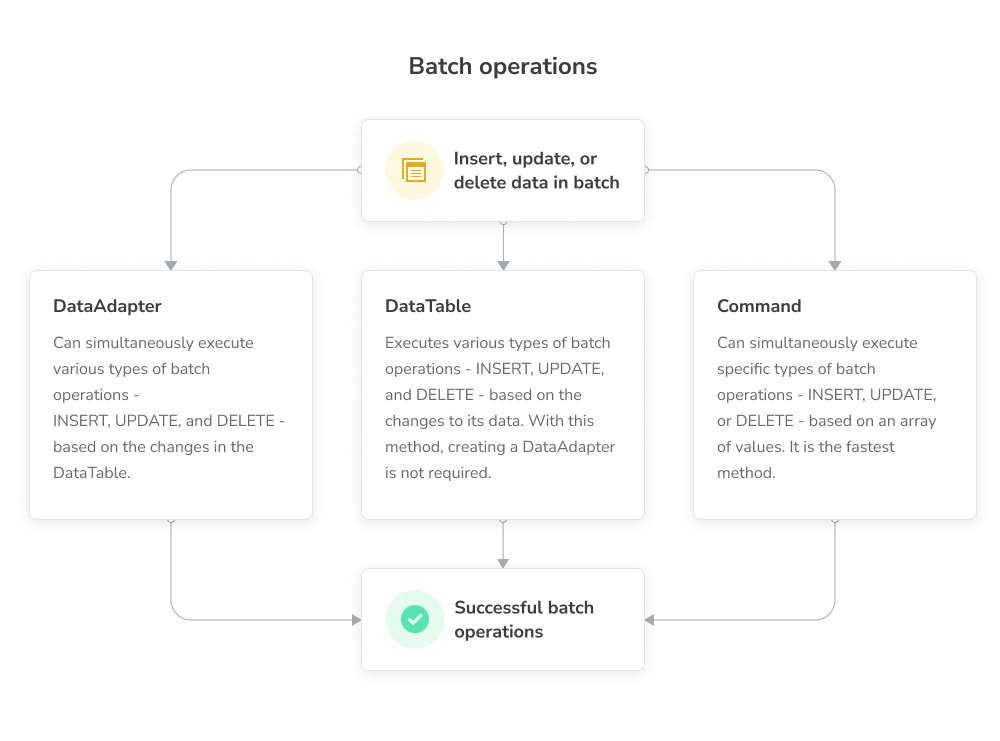
DataAdapter
Traditional approach for batch operations using ADO.NET’s DataAdapter. Allows multiple DML operations (INSERT, UPDATE, DELETE) to be executed in a batch with configurable batch sizes.
Code example:
using (var connection = new DbConnection("Connection_String"))
{
    connection.Open();
    var dataTable = new DataTable();
    dataTable.Columns.Add("ID", typeof(int));
    dataTable.Columns.Add("Name", typeof(string));

    // Add rows to DataTable
    dataTable.Rows.Add(1, "Item 1");
    dataTable.Rows.Add(2, "Item 2");

    var adapter = new DbDataAdapter();
    adapter.InsertCommand = new DbCommand("INSERT INTO TableName (ID, Name) VALUES (:ID, :Name)", connection);
    adapter.UpdateBatchSize = 2;

    // Execute the batch
    adapter.Update(dataTable);
}
DataTable
Simplified approach that eliminates the need for DataAdapter. Operations are performed directly on a DataTable, with automatic SQL command generation and configurable batch sizes, making it faster and easier to handle batch updates.
Code example:
using (var connection = new DbConnection("Connection_String"))
{
    connection.Open();
    var dataTable = new DbDataTable();
    dataTable.SelectCommand = new DbCommand("SELECT * FROM TableName", connection);
    dataTable.Open();

    // Add rows to DataTable
    dataTable.Rows.Add(1, "Item 1");
    dataTable.Rows.Add(2, "Item 2");

    // Set batch size
    dataTable.UpdateBatchSize = 2;

    // Execute the update
    dataTable.Update();
}
Command
For single-type batch operations (INSERT, UPDATE, DELETE), this method provides the highest performance. It uses arrays for parameter binding and executes all operations in a single batch with the ExecuteArray() method.
Code example:
using (var connection = new DbConnection("Connection_String"))
{
    connection.Open();
    var command = new DbCommand("INSERT INTO TableName (ID, Name) VALUES (:ID, :Name)", connection);

    command.Parameters.Add("ID", DbType.Int32);
    command.Parameters.Add("Name", DbType.String);

    // Bind arrays to parameters
    command.Parameters["ID"].Value = new int[] { 1, 2 };
    command.Parameters["Name"].Value = new string[] { "Item 1", "Item 2" };

    // Execute the batch
    command.ExecuteArray();
}
Batch update performance comparison table
The following table shows execution time in seconds for different batch update approaches across popular databases. The Simple method runs separate commands in a loop, while DataAdapter.Update(), DataTable.Update(), and Command.ExecuteArray() use Batch Updates. In every case, batch-based methods cut execution time dramatically compared to the simple approach, with Command.ExecuteArray() delivering the highest performance for single-type operations.
| Method | INSERT (sec.) | UPDATE (sec.) | DELETE (sec.) |
|---|---|---|---|
| MySQL | |||
| Simple | 48,392 | 49,915 | 48,118 |
| DataAdapter.Update() | 0,987 | 1,472 | 1,283 |
| MySqlDataTable.Update() | 0,938 | 1,384 | 1,179 |
| MySqlCommand.ExecuteArray() | 0,915 | 1,57 | 1,087 |
| PostgreSQL | |||
| Simple | 8,455 | 8,865 | 8,537 |
| DataAdapter.Update() | 0,287 | 4,742 | 4,227 |
| PgSqlDataTable.Update() | 0,259 | 4,546 | 4,172 |
| PgSqlCommand.ExecuteArray() | 0,163 | 4,016 | 3,785 |
| SQL Server | |||
| Simple | 5,321 | 4,479 | 4,062 |
| DataAdapter.Update() | 0,657 | 0,974 | 0,426 |
| SqlDataTable.Update() | 0,637 | 0,926 | 0,418 |
| SqlCommand.ExecuteArray() | 0,615 | 0,919 | 0,381 |
| SQLite | |||
| Simple | 83,412 | 71,926 | 77,371 |
| DataAdapter.Update() | 0,179 | 0,167 | 0,161 |
| SQLiteDataTable.Update() | 0,215 | 0,179 | 0,202 |
| SQLiteCommand.ExecuteArray() | 0,049 | 0,069 | 0,036 |
| DB2 | |||
| Simple | 0,419 | 0,366 | 0,223 |
| DataAdapter.Update() | 0,125 | 0,241 | 0,196 |
| DB2DataTable.Update() | 0,119 | 0,238 | 0,155 |
| DB2Command.ExecuteArray() | 0,037 | 0,126 | 0,137 |

PgSqlNumeric data type
dotConnect for PostgreSQL introduces the PgSqlNumeric data type to provide full support for all PostgreSQL NUMERIC capabilities, including very high precision and scale. This type lets you insert, read, and process NUMERIC values without losing accuracy, even for long numbers.
using Devart.Data.PostgreSql;

using (var connection = new PgSqlConnection(
    "Host=127.0.0.1;Port=5432;User Id=TestUser;Password=TestPassword;Database=TestDB;"))
{
    connection.Open();

    var insertCommand = new PgSqlCommand(
        "INSERT INTO numeric_test (f_numeric) VALUES (:p1)", connection);

    insertCommand.Parameters.Add("p1", PgSqlNumeric.Parse(new string('9', 50)));
    insertCommand.ExecuteNonQuery();

    var selectCommand = new PgSqlCommand(
        "SELECT f_numeric FROM numeric_test", connection);

    using (var reader = selectCommand.ExecuteReader())
    {
        while (reader.Read())
            Console.WriteLine(reader.GetProviderSpecificValue(0));
    }
}
Other improvements
- Added support for SQL Server Reporting Services 2017 (15), 2019 (16), and 2022 (17).
- Improved
OracleLoaderperformance for LOB types in Direct mode.
- Added support for MariaDB 12.
- Added support for SingleStore (formerly MemSQL).
- Added support for SQL Server Reporting Services 2017 (15), 2019 (16), and 2022 (17).
- Added support for PostgreSQL 18.
- Added support for SQL Server Reporting Services 2017 (15), 2019 (16), and 2022 (17).
- Added support for savepoints in the
SQLiteTransactionclass. - Added support for SQL Server Reporting Services 2017 (15), 2019 (16), and 2022 (17).
- Added support for SQL Server Reporting Services 2017 (15), 2019 (16), and 2022 (17).
dotConnect for Salesforce Marketing Cloud
- Improved the Add Connection dialog in Visual Studio Server Explorer.

Transparent and unified licensing model
The new licensing system introduces a more transparent approach, with activation now handled through a unified key-based structure across the entire dotConnect line. This includes licenses for Developer, Server, and OEM. Existing customers will continue to work under the terms of their current licenses, with changes only applicable to new licenses.

Entity Developer licensing update
Entity Developer for commercial use is now offered with Professional and Standard Edition licenses, providing users with more flexible options. The free Express Edition will continue to be available, and all editions will now feature key-based licensing for a streamlined and secure activation process.

Deprecation of outdated technologies
In dotConnect 2025.1, Devart takes a bold step towards modernizing its product lineup by discontinuing support for several outdated technologies to streamline development and ensure long-term support.
- Support for .NET Standard 1.3 is removed in dotConnect for Oracle, dotConnect for MySQL, dotConnect for PostgreSQL, dotConnect for SQLite, and LinqConnect, in line with modern .NET target frameworks.
- Support for .NET Compact Framework is discontinued. As a result, the Mobile Editions of dotConnect for Oracle, dotConnect for MySQL, dotConnect for PostgreSQL, and dotConnect Universal are no longer available. This decision follows Microsoft ending support for Windows Mobile back in 2020. Consequently, LinqConnect for Metro, LinqConnect for Windows Phone, and LinqConnect for Silverlight are also discontinued.
- Older Visual Studio versions 2008, 2010, 2012, and 2013 are no longer supported. Development and testing now focus on more recent Visual Studio releases.
Furthermore, integrated SSIS Data Flow Components and Entity Developer will no longer be included in dotConnect products. These tools will now be available only as standalone solutions. This change provides users with greater flexibility to select and use only the features they need, thus smoothing their overall experience.
Existing customers of the discontinued editions will receive an equivalent higher-level edition at their current subscription rates.
Video overview
Ready to discover the enhanced performance of dotConnect 2025.1?
Download dotConnect 2025.1 now and start building faster, more efficient database applications today!