The MySQL ODBC driver is what keeps BI tools, reporting systems, and ETL pipelines connected to MySQL without errors. Teams have depended on it for years, and it’s still vital today, especially with MySQL ranked #2 worldwide in February 2026.
However, not all ODBC drivers are built alike. There are two categories: open-source options and commercial ones. While both connect applications to MySQL, they differ in areas like stability, performance, security, and support. Understanding these differences early helps avoid headaches once the driver is in active use.
This guide compares open-source and commercial MySQL ODBC drivers from a production-first perspective, explaining where each performs well, where limitations appear, and how to make the right choice.
Table of contents- Why choosing the right MySQL ODBC driver matters
- Why trust our ODBC driver reviews
- Open-source vs commercial MySQL ODBC Drivers: Key differences
- List of MySQL ODBC drivers
- MySQL ODBC driver comparison table (2026)
- How to choose the best MySQL ODBC driver
- Final verdict: Open-source or commercial MySQL ODBC driver?

Why choosing the right MySQL ODBC driver matters
Choosing the best ODBC drivers for MySQL determines how reliably applications interact with MySQL once they move beyond basic testing and into daily use. For teams running BI tools, reporting systems, and ETL pipelines over ODBC, the driver becomes a foundational part of the data stack.
In practice, the driver influences several critical areas:
- Connection reliability – whether long-running queries, scheduled reports, and batch jobs complete without dropped sessions or timeouts
- Data correctness – how accurately Unicode text, collations, and MySQL data types are handled across different tools
- Performance under load – the ability to process large result sets and concurrent queries without excessive latency or memory usage
- Authentication and encryption – compatibility with modern security requirements, certificates, and encrypted connections
- Operational stability – consistent behavior as usage scales and workloads shift from interactive queries to automated execution
When a driver falls short in any of these areas, problems surface as failed reports, slow dashboards, or unreliable ETL jobs, even though the underlying issue sits in the ODBC layer.
Why trust our ODBC driver reviews
These reviews are based on a consistent, hands-on evaluation framework applied equally to open-source and commercial MySQL ODBC connectors. The intent is to assess drivers using the same technical and operational criteria, independent of vendor positioning or licensing model.
Evaluation criteria
| Evaluation area | What was evaluated | Why it was included |
|---|---|---|
| Version currency | Release cadence and compatibility with supported MySQL Server versions (e.g., MySQL 5.7, 8.x, 9.x, MariaDB variants) | To assess maintenance activity and long-term deployment viability |
| OS support | Windows, macOS, and Linux coverage (32-bit and 64-bit) | To reflect real-world deployment environments |
| Feature depth | Unicode handling, SSL/TLS support, authentication methods, DSN configuration controls | To assess functional completeness at the driver level |
| Documentation quality | Setup guides, configuration references, and troubleshooting material | To evaluate ease of configuration and ongoing maintenance |
| Enterprise readiness | Support model, update guarantees, maintenance expectations | To assess long-term operational viability |
| Licensing model | Usage rights, redistribution limits, and embedding considerations | To identify potential adoption constraints in different deployment scenarios |
All drivers were reviewed using comparable workloads and configuration scenarios to ensure consistency across evaluations. The purpose of this framework is to define how drivers were assessed, not to favor open-source or commercial options.
With the evaluation framework established, the next step is to look at how these criteria translate into real-world differences.
Open-source vs commercial MySQL ODBC Drivers: Key differences
While open-source and commercial MySQL ODBC drivers are assessed using the same standards, they diverge in meaningful ways once they are deployed in production. The following table shows how.
| Criteria | Open-source MySQL ODBC drivers | Commercial MySQL ODBC drivers |
|---|---|---|
| Licensing and cost | Free to use, usually under GPL or similar licenses. Redistribution and commercial embedding may be restricted. | Paid licenses with clear commercial usage rights and predictable ownership costs. |
| Updates and maintenance | Updates depend on community or vendor priorities. Support for new MySQL or OS versions may lag. | Regular, vendor-driven releases aligned with MySQL and operating system updates. |
| Performance and stability | Works well for basic queries and light workloads. Behavior can vary under load. | Built for large result sets, concurrent connections, and long-running jobs. |
| Security and authentication | Basic encryption is usually available. Advanced security features may be limited or manual. | Designed with enterprise security in mind, including modern authentication and encryption. |
| Support | Community forums and issue trackers. Problem resolution depends on internal expertise. | Vendor-backed support with documentation and defined response paths. |
| Production readiness | Requires more internal testing and monitoring to manage risk. | Intended for production systems where stability and accountability are required. |
| Best use cases | Development, testing, internal tools, and non-critical reporting. | Production BI systems, ETL pipelines, and business-critical workloads. |
Bottom line: both options can work, but they fail differently. Open-source drivers trade lower cost for higher operational responsibility. Commercial drivers trade licensing cost for stability, support, and fewer surprises in production.
List of MySQL ODBC drivers
This section reviews the best MySQL ODBC connectors in 2026, based on the evaluation framework outlined earlier.
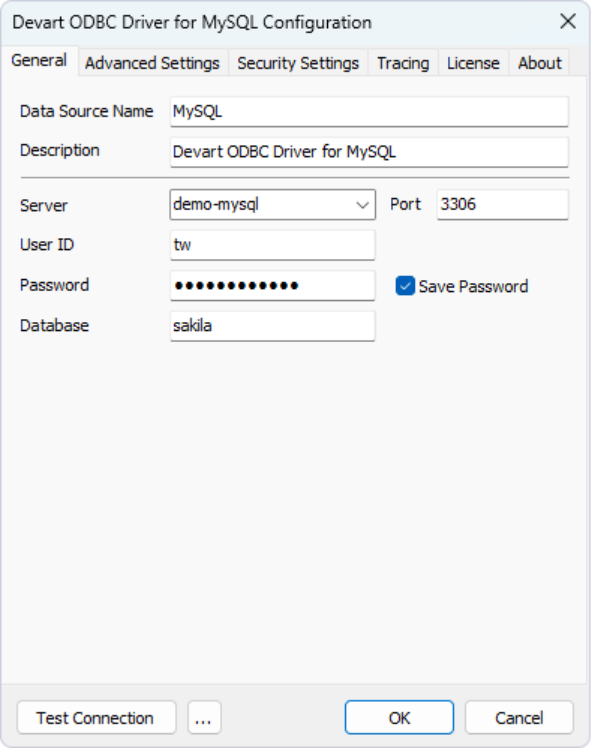
Devart’s ODBC Driver for MySQL is included as a commercial reference point because it is positioned specifically for enterprise and production use across Windows, macOS, and Linux, providing a useful benchmark for comparison against other options.
1. Devart ODBC Driver for MySQL (Commercial)

Company: Devart
Platforms: Windows, macOS, Linux (32-bit and 64-bit).
MySQL versions: Supports MySQL Server versions from legacy releases through current versions (9.x, 8.x, 6.0, 5.x, 4.x, 3.23), as well as MariaDB (5.x-12.x.) and cloud-managed MySQL services.
Best for: Business-critical BI, ETL, or large-scale MySQL reporting environments.
This driver is a commercial-grade solution designed to deliver stability in environments that require strict security and controlled MySQL access. It supports connectivity not only to on-premises MySQL servers but also to MariaDB deployments and managed cloud services such as Amazon RDS and Azure Database for MySQL. In short, it’s built for long-term reliability where uptime, compliance, and flexible deployment options matter.
Features:
- Native cross-platform support (Windows, macOS, Linux, 32/64-bit).
- Built-in secure connectivity options (SSH, HTTP tunneling).
- Support for MariaDB and cloud-hosted MySQL services (e.g., Amazon RDS, Azure Database for MySQL).
- Optimized performance for large datasets and parallel query loads.
Pros and cons
| Pros | Cons |
|---|---|
| Reduces risk in regulated or restricted networks | Higher cost than open-source alternatives |
| Vendor support ensures faster issue resolution | Not ideal for small teams with simple connectivity |
Price
Pricing depends on license type and deployment scope. At the time of writing, subscription tiers include:
- Desktop: from $139.95 per year.
- Desktop Universal Bundle: $499.95 per year.
- Server Standard (up to 6 cores): $899.95 per year.
- Enterprise / OEM / Site: custom pricing (quote required).
A free trial is available, allowing teams to evaluate the driver before purchase. Full details are available on Devart’s official pricing page.
2. MySQL Connector/ODBC (Open-Source)

Company: Oracle
Platforms: Windows, Linux, macOS, Unix (64-bit).
MySQL versions: Supports active MySQL Server releases (primarily MySQL 8.0 and newer).
Best for: General internal BI, ETL, and reporting use, especially where open-source licensing is acceptable.
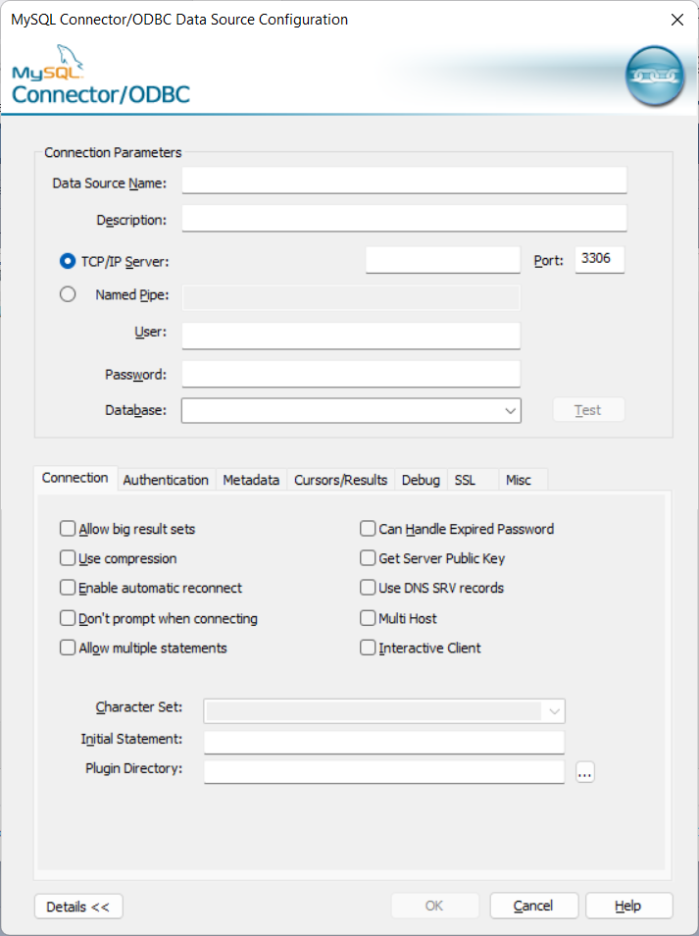
The MySQL Connector/ODBC, developed by Oracle, is the go-to open-source driver for broad MySQL compatibility. As part of the official MySQL ecosystem, it’s trusted and widely adopted for internal applications. However, teams should be aware of licensing considerations if they plan to redistribute it.
Features:
- Cross-platform support (Windows, Linux, macOS, Unix, 64-bit).
- Actively maintained with current releases (e.g., version 9.6.0).
- GPL licensing with FOSS exception, relevant for redistribution scenarios.
Pros and cons
| Pros | Cons |
|---|---|
| Free, open-source, and widely used | The GPL license may restrict redistribution in commercial products |
| Strong cross-platform compatibility | Lacks vendor-backed support, requiring internal troubleshooting |
| Official Oracle/MySQL ecosystem | Feature updates may lag compared to commercial alternatives |
Price
Free for internal use. The primary “cost” is internal time spent on support or troubleshooting, especially in larger or more complex deployments.
3. Simba MySQL ODBC Driver (Commercial)

Company: Insightsoftware (Simba)
Platforms: Windows, Linux, macOS (32/64-bit).
MySQL versions: Supports current enterprise MySQL Server deployments.
Best for: Enterprises needing high-performance, stable MySQL connectivity across BI tools and long-running queries.
The Simba MySQL ODBC driver is built for enterprises that require dependable, high-performance data access across BI tools. It’s designed to ensure consistent behavior during complex queries and long-running workflows, especially in environments with mixed operating systems. As part of a broader managed connectivity suite, it supports enterprises seeking a unified approach to data access.
Features:
- ODBC 3.8 compliance for broad compatibility
- Unicode (UTF-8) support for multilingual datasets
- Part of a managed connectivity portfolio for standardized deployments
Pros and cons
| Pros | Cons |
|---|---|
| Consistent performance across Windows and Linux | Pricing is quote-based, requiring a sales inquiry |
| Enterprise-grade specs for BI tool stability | Licensing overhead may not suit smaller or non-enterprise users |
| Part of a larger portfolio for centralized support | May be overkill for simple or one-off MySQL connectivity needs |
Price
Pricing is commercial and typically quote-based. It varies by deployment model and support level, so a direct vendor inquiry is required.
4. CData ODBC Driver for MySQL (Commercial)

Company: CData Software
Platforms: Windows, Linux, macOS (32/64-bit).
MySQL versions: supports major MySQL Server versions, including MySQL 5.7 and 8.x.
Best for: Teams that prioritize predictable pricing and broad BI tool integration.
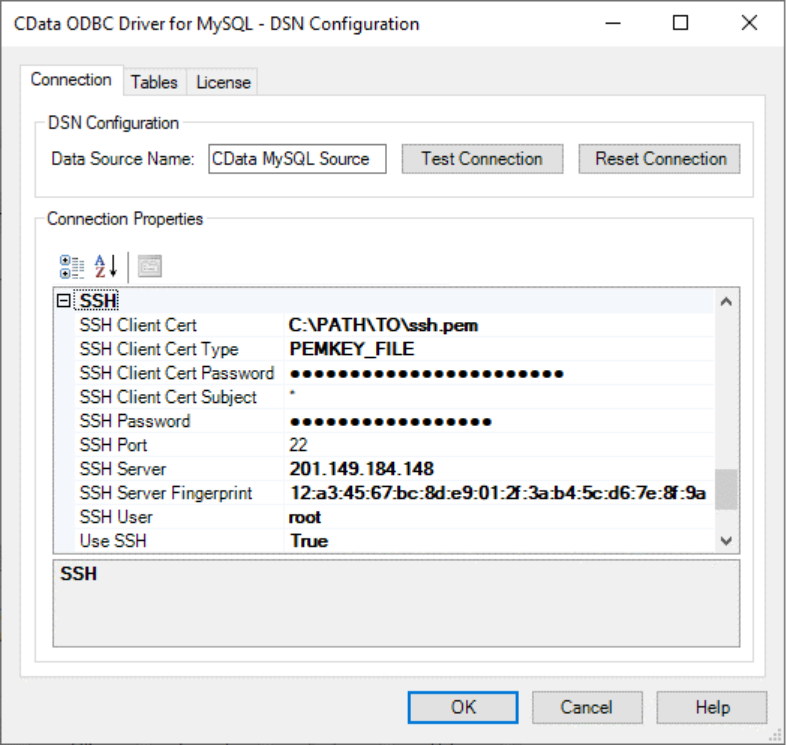
CData’s MySQL ODBC driver is a commercial ODBC connector designed to provide a consistent, standards-based interface between MySQL and external applications. It emphasizes broad interoperability across ODBC-compliant tools, making it a practical choice in environments where MySQL is accessed by multiple analytics or integration systems.
Features:
- ODBC standards compliance for broad BI/ETL compatibility
- Cross-platform installers (Windows, macOS, Linux)
- Designed to handle large datasets and complex queries in BI workflows
Pros and cons
| Pros | Cons |
|---|---|
| Transparent pricing—no sales cycle | Licensing may be overkill for smaller or internal-only setups |
| Broad tool compatibility focus | Long-term value depends on vendor support needs |
| Simple cross-platform deployment |
Price
Starts at $399/year for desktop licenses. Server tiers and custom pricing are available based on deployment and support needs.
MySQL ODBC driver comparison table (2026)
The following table provides a side-by-side comparison of the discussed ODBC MySQL drivers. It focuses on performance, security, platform support, and operational readiness.
| Driver | Type | Performance | Security | Architecture | MySQL Server versions | OS support | Best for |
|---|---|---|---|---|---|---|---|
| Devart ODBC Driver for MySQL | Commercial | 4/5 | 4/5 | 32-bit and 64-bit | MySQL 3.x–8.x+, MariaDB, and cloud-managed MySQL services | Windows / macOS / Linux | Production BI & ETL |
| MySQL Connector/ODBC | Open-Source | 3/5 | 2/5 | 64-bit only | Active MySQL Server releases (primarily MySQL 8.0+) | Windows / Linux / macOS / Unix | Basic and internal usage |
| Simba MySQL ODBC Driver | Commercial | 4/5 | 4/5 | 32-bit and 64-bit | Current enterprise MySQL Server deployments | Windows / macOS / Linux | Enterprise BI & analytics |
| CData ODBC Driver for MySQL | Commercial | 4/5 | 4/5 | 32-bit and 64-bit | Major MySQL Server versions used in production environments | Windows / macOS / Linux | BI, reporting, integration |
Server version compatibility reflects commonly supported production releases at the time of writing. Teams should verify exact support for legacy versions or forks before deployment.
Notes:
- Performance and security ratings are relative within this comparison and reflect production positioning rather than benchmark testing.
- MySQL Connector/ODBC platform support is based on Oracle documentation.
- Devart, Simba, and CData platform support is based on vendor documentation and published installers.
How to choose the best MySQL ODBC driver
Start with the following five practical filters:
1. Match the driver to your workload
If you’re dealing with large extracts, long-running queries, or concurrent connections, look for drivers designed to behave consistently under sustained load. Open-source drivers can work, but they tend to vary more across environments and edge cases as usage grows.
2. Check how well it plays with your BI tools
Most teams don’t live in a single BI tool. Excel, Power BI, Tableau, and older reporting stacks all place slightly different demands on ODBC. Favor drivers with a track record of broad compatibility to avoid tool-specific quirks later.
3. Be realistic about security requirements
Don’t stop at “supports TLS.” If your environment limits direct database access, make sure the driver supports secure connection patterns that fit your network model, rather than relying on custom or fragile workarounds.
4. Think ahead about licensing
If the driver will be embedded in a product or redistributed, review licensing early. Some open-source drivers are perfectly fine for internal use but become problematic once software is shipped or commercialized.
5. Decide how much support you’ll actually need
When something breaks in production, ask yourself how you expect it to be fixed. In 2026, vendor-backed support often makes the difference between a same-day resolution and recurring operational debt as platforms and security policies change.
In practice: the best MySQL ODBC driver is the one that fits your workload, your risk tolerance, and how much operational responsibility your team is willing to carry.
Final verdict: Open-source or commercial MySQL ODBC driver?
The right choice depends less on ideology and more on how much failure you can tolerate. Open-source drivers make sense when workloads are lightweight, downtime is acceptable, and your team is comfortable owning and troubleshooting end-to-end. Commercial drivers make sense when the ODBC layer sits inside a business-critical workflow, and reliability, security, and support are non-negotiable.
A practical way to decide is to think about the workload’s blast radius. If a failed extract only affects one analyst or an internal report, starting with an open-source driver is reasonable. It gives you a low-cost baseline and a way to validate behavior against your real datasets and tools.
If failures affect revenue reporting, compliance processes, customer-facing dashboards, or scheduled ETL jobs, the calculus changes. In those cases, commercial drivers often pay for themselves by reducing incident frequency and shortening recovery time.
That’s why many teams standardize on commercial drivers such as Devart’s ODBC Driver for MySQL for production and keep an open-source option for development or testing.